
Environments
Working with Environments
spektr provides three distinct environments to support dev and test lifecycle: Live, Sandbox, and Test. This multi-environment setup allows you to build, test, and deploy changes safely without impacting your production data or users.
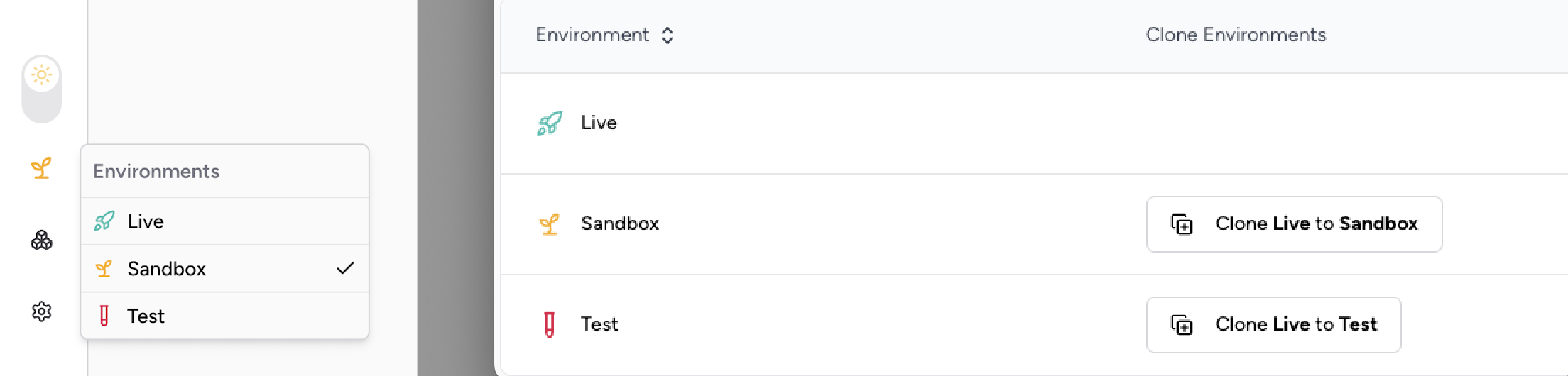
Environment Overview
Each environment is isolated and serves a specific purpose. You can easily switch between them from the left navigation bar:
| Environment | Purpose | Endpoint URL | Key Characteristics |
|---|---|---|---|
| Live | Serves all live traffic and real user data. | https://api.spektr.com | Real data, full performance, production-ready. |
| Sandbox | Environment for UAT and functional testing. | https://sandbox-api.spektr.com | Cloned configuration, mocked vendor data, throttled. |
| Test | A development env for engineering teams. | https://test-api.spektr.com | Cloned configuration, mocked vendor data, throttled. |
To access any API in the sandbox environment, prefix the endpoint with sandbox-
For instance, to connect to the Ingest API in the sandbox, use the following endpoint:
sandbox-ingest.spektr.com
Cloning Configuration
To ensure your testing environments accurately reflect production, you can clone configurations from the Live environment to either Sandbox or Test.
Cloning is a one-way operation. You can clone from Live → Sandbox or Live → Test. It is not possible to clone from Sandbox to Test, or from a lower environment back to Live.
✅ What Can Be Cloned:
- Processes
- Themes
- Fields
- Translations
- Dataset schemas
❌ What Cannot Be Cloned:
- Client Data: The standard clone operation never copies client or user data. To ensure data privacy and security,
Live → SandboxandLive → Testclones leave customer records, transactions, and other customer data out entirely. Datasets will have their schemas cloned, but they will be empty in the Sandbox and Test environments.
Opt-in Live → Sandbox data copySeparately from the standard clone above, spektr can optionally copy a workspace's Live transactions and client records into that same workspace's Sandbox tier to support realistic testing. This copy is off by default, is enabled for a single workspace at a time, and requires written customer and Legal/DPO sign-off before it can be turned on. It is a distinct, gated mechanism. The standard clone behaviour described above is unchanged and still never copies customer data.
Environment-Specific Settings
Certain configurations are unique to each environment, giving you flexibility in your development workflow.
API Keys 🔑
API keys are not shared between environments. Each environment (Live, Sandbox, and Test) has its own independent set of API keys. You must generate and manage keys for each environment separately.
Important: Always store your API keys securely and never expose them in client-side code.
Webhooks
Webhooks can be configured independently for each environment. This allows you to, for example, point your Sandbox webhooks to a staging server and your Live webhooks to a production server.
Global Settings: User Permissions
User permissions are managed globally and are not environment-specific. Permissions are configured only in the Live environment and are automatically inherited by the Sandbox and Test environments.
Sandbox & Test Environment Behavior
The Sandbox and Test environments are designed for development and have specific behaviors and limitations
Mocked Vendor Responses 🧪 (TBD)
To provide a predictable and stable testing experience, outbound requests to third-party vendors are not sent in the Sandbox and Test environments. Instead, the API returns a hardcoded, mocked success response.
Below is a sample JSON response you can expect for a typical vendor call in these environments:
Rate limiting & quotas
The Sandbox and Test environments have limited quotas and are throttled to a lower rate of requests per second (RPS) compared to the Live environment.
Updated about 2 months ago