
Customer monitoring
Customer monitoring
Re-check customers on a schedule or on demand, whether they come from a dataset or from your onboarding process, and get alerts and status changes back into your systems.
At a glance
| Where | What you do |
|---|---|
| Dashboard | Attach a monitoring process to a dataset, set its schedule, publish it, and add a delivery rule. |
| API | POST /v1/data and PUT /v1/data/{datasetId} to load customers. POST /v3/execution to run on demand. GET /v1/record/bulk/fetch/api to reconcile. |
| Back to you | alert_escalated, alert_resolved, process_run_end and the tag events. |
Before you start
- An API key. Every call sends a workspace-scoped
x-api-keyheader. Each environment has its own API host. - A dataset. It holds one record per customer, with your
referenceand aspektrId. You create it in step 1. See your datasets. - A published monitoring process. You build it in the dashboard in step 2 and note its id. See add a new monitoring process.
- A webhook endpoint. spektr posts alerts, status and tag changes to it. See Webhooks.
How it works
You load your customers into a dataset and use it as the source of a monitoring process. Each run evaluates every customer, and the filter step decides per customer whether the rest of the process runs. The process rescreens, applies scenarios, routes to manual review and sets status and tags. Alerts and cases have no REST endpoint, so results arrive as webhooks or by pulling the record.
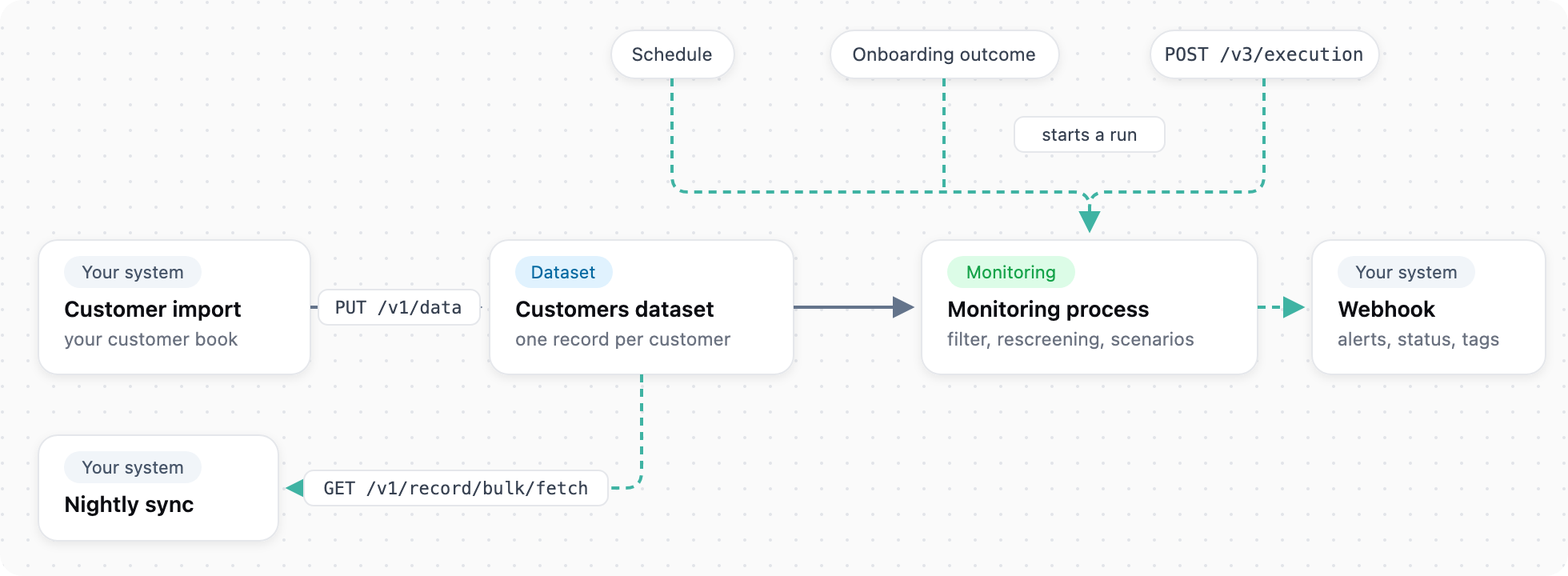
Load customers, run monitoring, get alerts back.
Choose how to start
| Trigger | How | source.sourceType on events |
|---|---|---|
| Schedule | Set on the process: frequency day, week or month, an interval and a start date | unknown for now |
| Manually | Start a run from the dashboard | manual |
| On demand | POST /v3/execution, for example after an import or a material change | external |
| Chained | Started by another process, such as onboarding. Set in the process builder | spektr_process, with source.processId of the originating process |
A chained process runs for every customer that has reached it.
Integrate
The example monitors three business customers in a dataset called Customers: Nordic Outdoor AB (c_1029), Fjord Logistics AS (c_1030) and Baltic Timber OÜ (c_1031). The process rescreens each company, sends HIGH risk to manual review, sets the status, and tags Requires monitoring when a scenario fires.
1. Load your customers
Server-side
Create the dataset with POST /v1/data, a name and a dataType map. The response returns the datasetId. Then upsert records with PUT /v1/data/{datasetId}, at most 5,000 per call. The response returns one spektrId per entry, in order.
PUT https://ingest.spektr.com/v1/data/686660b573833dea357e8701
x-api-key: <key>
idempotency-key: 6f1c2d3e-1111-4c4c-8d8d-aaaaaaaaaaaa

{
  "upsertMethod": "merge",
  "data": [
    { "reference": "c_1029", "company_name": "Nordic Outdoor AB", "company_number": "5591234567", "country_of_incorporation": "SE", "risk_level": "LOW" }
  ]
}
Matching is by reference only. A reference needs to be unique, so keep one stable reference per customer, and say merge or overwrite every time, because overwrite is the default and clears fields a partial payload leaves out. The full walkthrough, including files and field types, is in Data import.
Reference: create a dataset, import or upsert records
2. Build the monitoring process
Platform
Attach the process to the dataset, add steps, set the schedule and publish. Its id is the processId. A scheduled run covers every record in the dataset whatever its status, so exclude archived customers in the filter step. See add a new monitoring process.
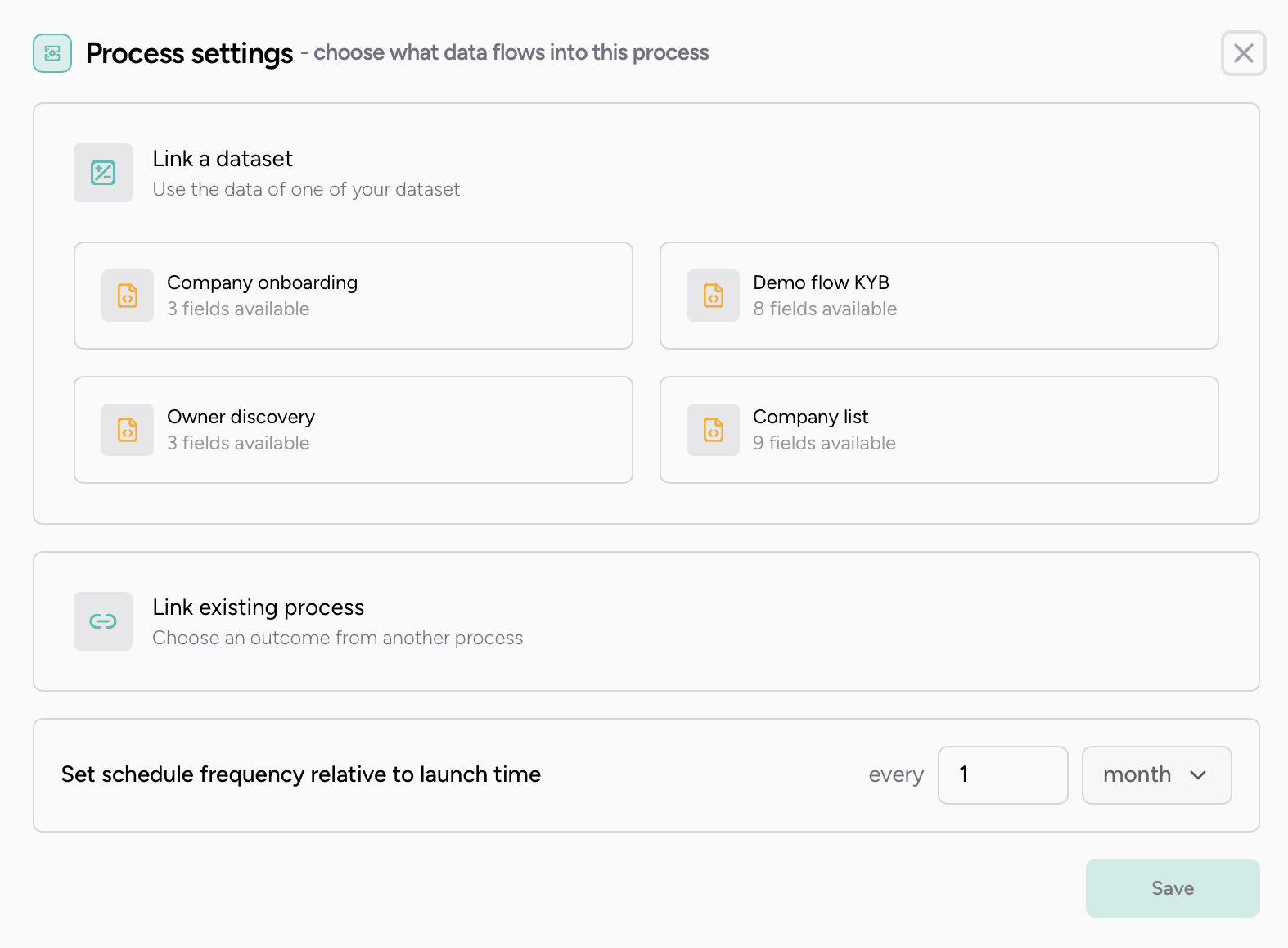
Process settings for monitoring: dataset and schedule.
3. Configure delivery rules
Platform
Under Settings > Developer > Export settings, set your endpoint, choose API key or HMAC authentication, and add a per-process rule for the monitoring process with the events you want. Timing is on submit, as each event is recorded, or end of process.
Reference: Webhooks, alerts management
4. Run on demand
Server-side
Send the processId and a list of ids, each typed spektrId or reference. New runs use the live published version. A customer with an unfinished run of this process, for example in manual review, is skipped and that run is returned. Set refreshTokenOnVersionMismatch to true to restart it when it is on an older version. No endpoint lists open monitoring runs.
POST https://ingest.spektr.com/v3/execution
x-api-key: <key>

{
  "processId": "686660b573833dea357e86f6",
  "ids": [
    { "id": "c_1029", "type": "reference" },
    { "id": "c_1031", "type": "reference" }
  ],
  "refreshTokenOnVersionMismatch": true
}
Reference: run a process now
5. Handle alerts and status changes
Server-side
Create a task on alert_escalated and close it on alert_resolved, keyed on data.alertId. Update the customer's standing from customerStatus on process_run_end, and from customer_status_changed when a user or the API changes it. Mirror tags from the tag events. One POST can carry several events, so iterate results, deduplicate on event id, and acknowledge with any 2xx.
Reference: process_run_end, alerts management
6. Keep records current
Server-side
Change fields or status on one record with PATCH /v2/record/{id}?type=reference. status accepts pending, approved, rejected or archived. Use archived when a customer leaves. A process never moves an approved, rejected or archived record back to pending.
Reference: update a record
7. Sync back nightly
Server-side
Pull changed records with GET /v1/record/bulk/fetch/api or GET /v1/record/bulk/fetch/s3, updatedAfter set to your last watermark and maxCount, which is required. The API call returns up to 5,000 records. The S3 call returns presigned URLs to gzip-compressed JSON files, which you download within an hour. Page until token disappears.
Reference: bulk fetch in response, bulk fetch via S3
Test it
Sandbox and Test environments in the workspace clone processes, fields and schemas from Live, never client data. Load a test book with Sandbox keys and endpoint. Vendor behaviour per environment is described in Environments.
To test alert paths deterministically, make a scenario or manual review fire on a data value you control. The dashboard side is in testing a process.
Go-live checklist
- The monitoring process is published on the dataset and your
referencescheme is fixed. - Every import sends
upsertMethodand anidempotency-key. - The filter step excludes archived customers.
- You store each record's
spektrIdnext to itsreference. -
alert_escalatedopens a task andalert_resolvedcloses it, keyed onalertId. - The nightly fetch persists its
updatedAfterwatermark and followstokento the end. - Live keys and a Live webhook endpoint are configured separately from Sandbox.
Next steps
- Get results into your systems. Every event and its payload is in the webhook events reference.
- Verify webhooks. See Webhook HMAC signature verification and make retries safe with Idempotent requests.
- Feed signals back in. Import events and signals for event orchestration processes.
- Full API. Every call above is in the API reference.
Behaviour described here reflects the platform on 2 October 2026.
Updated about 15 hours ago