
Customer onboarding
Customer onboarding
Onboard a company end to end: collect its data and documents, screen the company and its owners, and receive the decision in your systems.
At a glance
| Where | What you do |
|---|---|
| Dashboard | Build and publish the onboarding process, and add a delivery rule for your webhook. |
| API | POST /v2/public/actions/processId/{processId}/workspaceId/{workspaceId} to start. Embedded form: GET /v2/public/actions/{token}, POST /v3/public/actions/{token}, then /confirm for files. Owners: POST /v1/record/relations. |
| Back to you | process_run_end with the decision, and loop_run_start for each owner. |
Before you start
- An API key. Every call sends a workspace-scoped
x-api-keyheader. Each environment has its own API host. - A published onboarding process. Build it in the dashboard and note its id. See add a new onboarding process, onboarding companies and the ownership tree form.
- A webhook endpoint. spektr posts events to it. You point a delivery rule at it under Settings > Developer > Export settings. See Webhooks.
How it works
You start a run for one company, by calling Start Onboarding. A run is one execution of your process for that record. The end client fills in a form, hosted by spektr or rendered in your product. spektr then screens the company, maps its owners and starts a separate loop run for each director and owner. An analyst reviews the case, the process sets the customer status, and process_run_end delivers the outcome to your webhook.
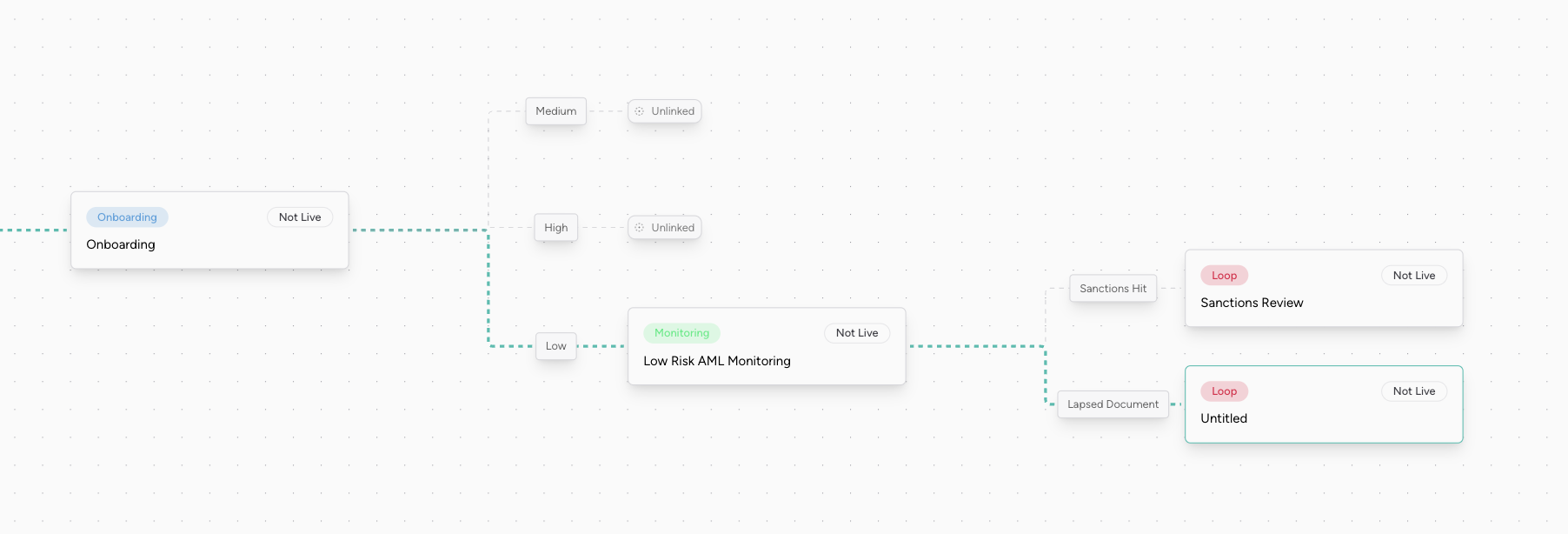
An onboarding process in the builder. Each outcome can start the next process.
Choose how to start
| Option | Use it when | What you build |
|---|---|---|
| Start Onboarding v2, hosted | The end client fills in the form | One server call, then a link to https://actions.spektr.com/form?token={token} (or your custom domain) |
| Start Onboarding v2, embedded | The form lives in your product | Your own UI for every step type, through your backend and the client-sdk. This is the most work |
| Chained | Another process starts it from one of its outcomes | A process link, set in the process builder. See Connect your processes |
| Execute process v3 | Run or re-run a process on an existing record, by spektrId or reference | One server call. It returns a token if a form is involved |
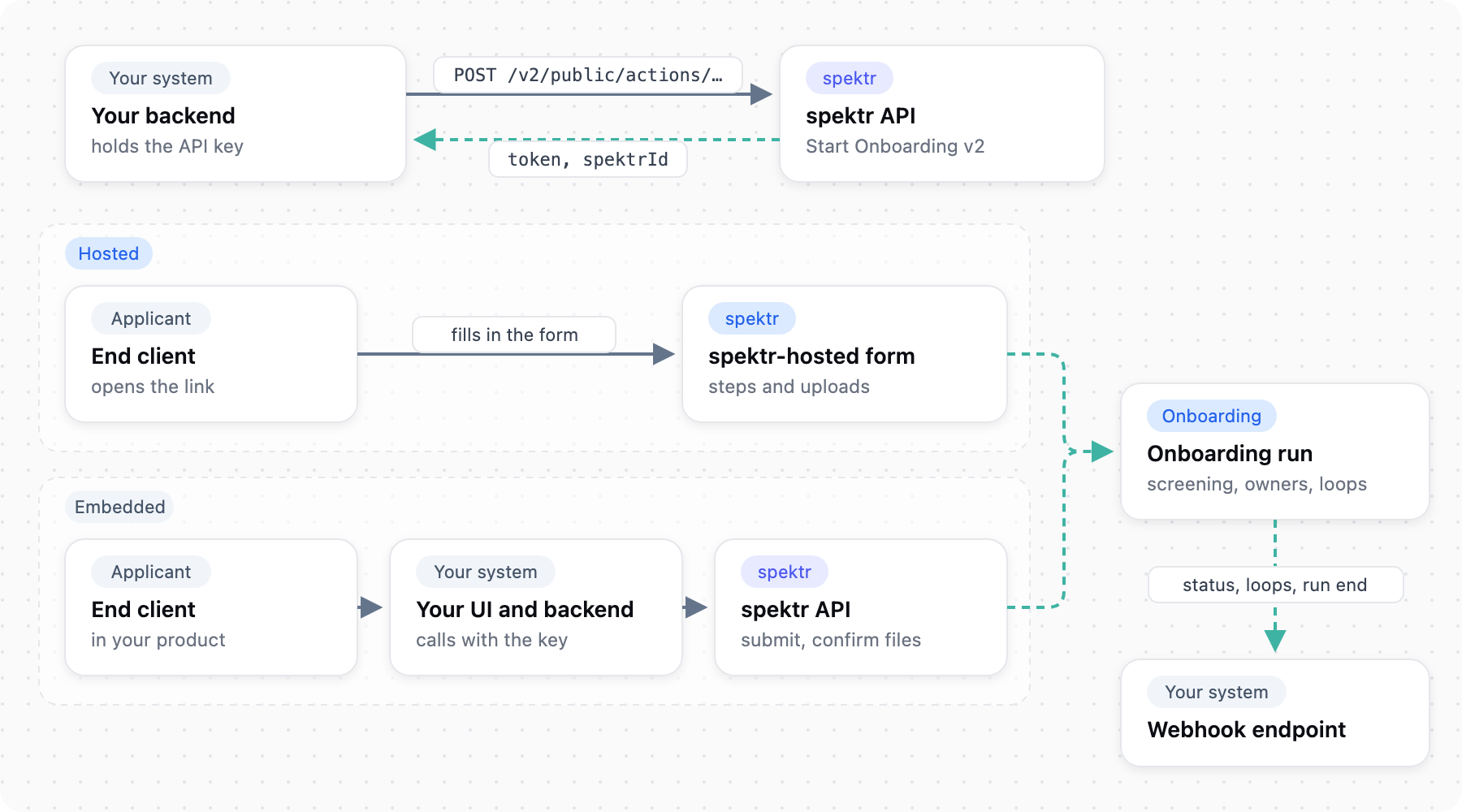
How an onboarding runs, hosted or embedded, and the events it sends.
Integrate
The example onboards Nordic Outdoor AB, reference c_1029, a Swedish retailer applying to become a merchant. Its director is Anna Lind and its 60 percent owner is Erik Berg. The workspace id is ws_example and the published onboarding process id is 686660b573833dea357e86f6.
Every call needs the x-api-key header, including steps 2 and 3, which the end client drives. The key must never reach a browser, so make those calls through your backend.
1. Start the onboarding
Server-side
Start Onboarding v2 creates the record and the run. The 201 response returns a token, which identifies the run in every later call, and the spektrId spektr generated for the record.
POST https://ingest.spektr.com/v2/public/actions/processId/686660b573833dea357e86f6/workspaceId/ws_example
x-api-key: <key>
idempotency-key: 1f2e3d4c-5b6a-4798-8a9b-0c1d2e3f4a5b

{
  "data": {
    "reference": "c_1029",
    "company_name": "Nordic Outdoor AB",
    "country_of_incorporation": "SE"
  }
}
For the hosted flow, send the end client to https://actions.spektr.com/form?token={token} and skip to step 4. You don't create a dataset: the onboarding process has its own, created in the dashboard, and the record goes into it.
Pick a reference you keep for good, or store the spektrId. A reference is unique across the workspace, and a reused one fails with 400 duplicate_reference. The token stays valid for 90 days.
Reference: Start Onboarding v2
2. Collect the form data
Embedded flow. The hosted page does this for you.
Fetch the current step with GET /v2/public/actions/{token} and a content-language header. node.type says what to render next, and execution.status says where the run is. Then submit the values.
POST https://ingest.spektr.com/v3/public/actions/eyJhbGciOiJIUzI1NiIsInR5cCI6IkpXVCJ9...?filledBy=Nordic%20Outdoor%20AB
x-api-key: <key>
content-language: en-GB

{
  "company_name": "Nordic Outdoor AB",
  "company_number": "5591234567",
  "country_of_incorporation": "SE",
  "registration_certificate": "registration.pdf"
}
filledBy names who filled in the form and is required. Without file fields the response is { "status": "completed" }. With file fields it is status: "accepted" and lists the uploads for step 3.
Reference: fetch current step, submit form data v3
3. Upload documents
Embedded flow.
The submit response holds one fileUploads entry per file, each with a presigned url and fields. POST each file as multipart/form-data to its url, with every entry in fields before the file. Then confirm with POST /v3/public/actions/{token}/confirm?filledBy=... and no body. It answers { "status": "completed" }.
Reference: confirm file uploads, Submitting files
4. Add directors and owners
Server-side
If you know the people, import them into a people dataset and link them to the company. Otherwise the ownership tree form collects them, or you can submit them inline as role-entity records with the form (see Submitting files). In relations, from is the company and to is the person.
POST https://ingest.spektr.com/v1/record/relations
x-api-key: <key>

[
  {
    "from": { "type": "reference", "value": "c_1029" },
    "to":   { "type": "reference", "value": "person-anna-lind-001" },
    "relationRole": "board_of_directors",
    "direct": true,
    "positions": [ "Director" ]
  },
  {
    "from": { "type": "reference", "value": "c_1029" },
    "to":   { "type": "reference", "value": "person-erik-berg-001" },
    "relationRole": "ultimate_beneficial_owners",
    "direct": true,
    "data": { "percentage": 60 }
  }
]
The loop step then starts one loop run per person. loop_run_start fires for each, and its data.loopUrl is the form link to send that person.
Reference: create relations
5. Set up delivery
Dashboard
Under Settings > Developer > Export settings, set your endpoint and authentication, then add a per-process rule on the onboarding process for process_run_end, loop_run_start and process_expired, plus external_data_waiting if you use an External Data step. A rule only delivers events for the processes it names, so one scoped to a different process delivers nothing. Choose onSubmit timing, because endOfProcess never flushes runs that end in timeout or vendorError.
Reference: Webhooks, Webhook HMAC signature verification
6. Get the decision
Dashboard and server-side
Manual review raises an alert that an analyst resolves in the dashboard. The customer status step then sets approved or rejected. When the run reaches its outcome, spektr sends process_run_end with processOutput, customerStatus and the dataset fields. Which of customerStatus, processOutput and score are filled depends on the nodes in your process, so check with whoever designs it. Earlier in the run you also typically get process_run_start, step events, and service_run for each vendor or AI agent call. You receive only the ones your rule lists. Webhooks arrive in batches and may repeat, so iterate results, record each event id, and ignore ids you have seen.
Reference: process_run_end, process runs
Rules that prevent rework
- Submit fields by data key, not label. A step shows
Company namebut you submitcompany_name. Dates are Unix milliseconds, countries are ISO-2 codes, multi-select values are lists of strings, and files are filenames you upload afterwards. referencecan't beroot. That value is reserved for the primary customer in ownership relations. Every related person or company needs its ownreference.- Retry safely. Send an
idempotency-keyon Start Onboarding. Addx-spektr-block-until-ready: trueand the server waits until the session accepts a submission, so you need not poll first.
Test it
Sandbox and Test environments in the workspace get a copy of Live configuration but never client data. How vendor steps behave in each environment is described in Environments.
You cannot force a run to end rejected for a test record. Design test records to exercise each router path, and check process_run_end or the record status. The dashboard side is in testing a process.
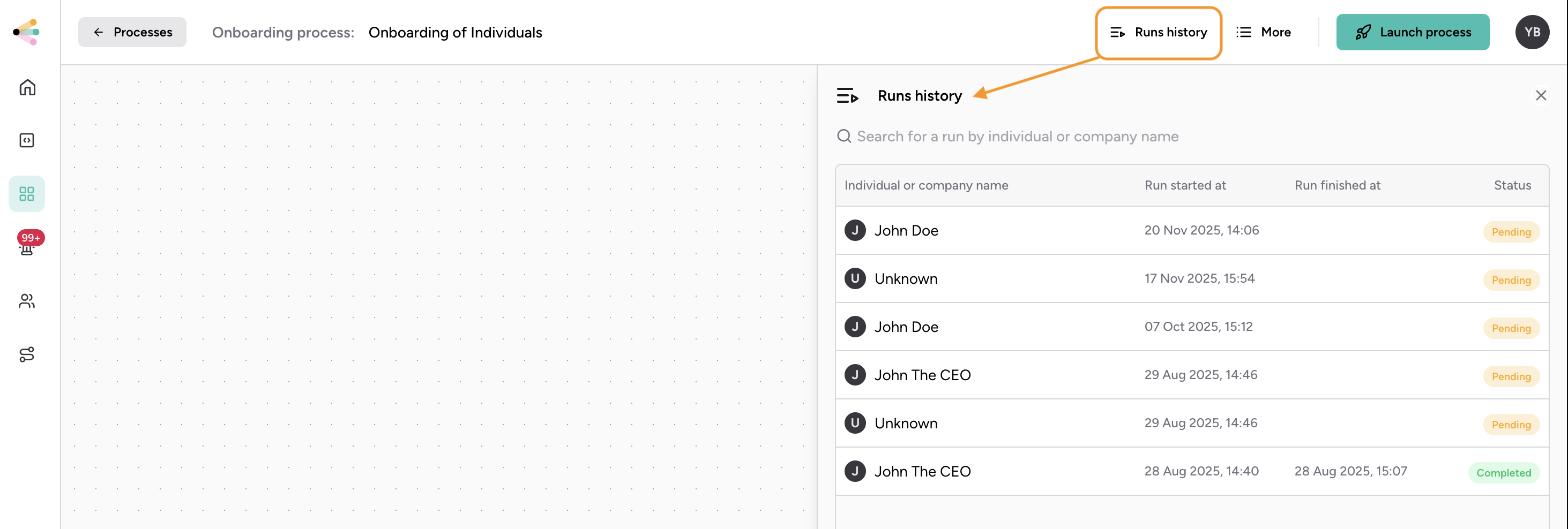
Runs history for a process.
Go-live checklist
- The onboarding and loop processes are published, and your
referencescheme is fixed. - Per-process delivery rules cover
process_run_end,loop_run_startandprocess_expired, plusexternal_data_waitingif you use an External Data step. - One Sandbox company with a file upload and a loop delivered every expected event once.
- Your webhook handler returns 2xx fast and ignores event ids it has seen.
-
process_expiredand410 context_expiredare handled, not retried. - Presigned uploads call
/confirmuntilcompleted. - Live keys and a Live webhook endpoint are configured separately from Sandbox.
Next steps
- Get results into your systems. Every event and its payload is in the webhook events reference.
- Verify webhooks. See Webhook HMAC signature verification and make retries safe with Idempotent requests.
- Full API. Every call above is in the API reference.
Behaviour described here reflects the platform on 2 October 2026.
Updated about 15 hours ago