
Transaction monitoring
Transaction monitoring
How to define your transactions in spektr, link them to the customers, merchants and accounts involved, and send them in.
At a glance
| Where | What you do |
|---|---|
| Dashboard | Build the rules and processes, and add a delivery rule for your webhook. |
| API | POST /v1/data per party, POST /v1/transaction-definitions once per type, then POST /v1/transactions/batch. Real-time: POST tm-ingestion.spektr.com/ingestion/v1/transactions. |
| Back to you | Alerts and run events on your webhook. Real-time runs return the result in the response. |
Before you start
- Transaction monitoring enabled on the workspace. Without it, registering a definition returns
403. - An API key. Every call sends a workspace-scoped
x-api-keyheader. Each environment has its own API host. - A dataset for each party. Customers, merchants and bank accounts each need one. You create them in step 1. See your datasets.
- A webhook endpoint. spektr posts events to it. You point a delivery rule at it under Settings > Developer > Export settings. See Webhooks.
How it works
You register a transaction definition once per transaction type. It declares the fields, which sub-objects are parties, the dataset each party is stored in, and the keys you aggregate by. Each linked sub-object creates or updates a client record in its bound dataset. Partition fields build the aggregation index, and other fields stay on the transaction. Your processes then compare what a customer declared at onboarding, kept on the record, with what they actually do.
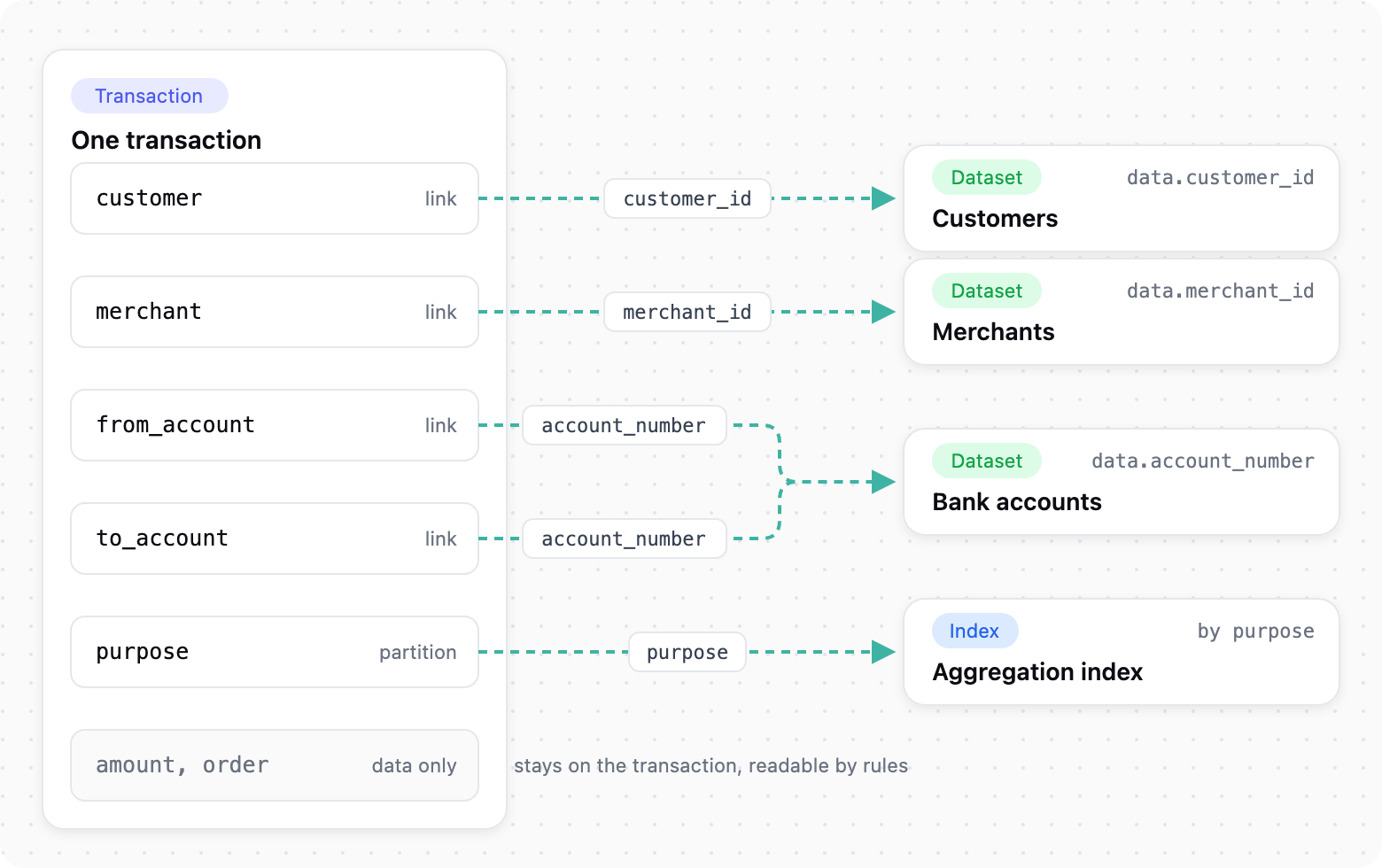
Each linked sub-object writes to a client record in its bound dataset.
Integrate
The example is a payment provider moving money between customers and merchants, with three party types: customer, merchant and bank account.
1. Create a dataset per party
Server-side
Create one dataset per party type with POST /v1/data, giving a name and a dataType. Include the identifier field the link will join on, such as merchant_id. Note each datasetId. Bindings are immutable, so choose each party's dataset before you register the definition. Both account legs can share one bank-account dataset, so one record holds both sides.
Reference: create a dataset
2. Define your transaction
Server-side
Register the definition with POST /v1/transaction-definitions. The call is an upsert on type. Comments in the example are for reading only, so strip them before sending.
{
  "name": "Example Payments",
  "type": "example_payment",
  "fields": {
    "created_at": "date?",
    "purpose": "string", // PAY_IN | PAY_OUT | REFUND. Required: it is a partition
    "payment_rail": "string?",
    "amount": {
      "value": "number?", // as received
      "currency": "string?",
      "amount_eur": "number?" // standardised upstream; thresholds evaluate on this
    },
    "customer": {
      "customer_id": "string", // link key
      "merged_customer_ids": "array?", // merge key: other ids for the same person
      "full_name": "string?",
      "is_pep": "string?", // "true" / "false": no boolean type
      "risk_level": "string?",
      "country_of_residence": "country?",
      "expected_monthly_volume_eur": "number?"
    },
    "merchant": {
      "merchant_id": "string", // link key
      "company_name": "string?",
      "mcc": "string?",
      "risk_level": "string?"
    },
    "from_account": {
      "account_number": "string?",
      "account_number_type": "string?",
      "country_code": "country?"
    }, // link key, optional: some rails carry no sender account
    "to_account": {
      "account_number": "string",
      "account_number_type": "string?",
      "country_code": "country?"
    }, // link key
    "order": {
      // data only: no link, no record
      "channel": "string?",
      "name_matches_account_holder": "string?"
    }
  },
  "link": [
    {
      "type": "customer",
      "txPath": "customer.customer_id",
      "clientRecordPath": "data.customer_id",
      "mergeTxPath": "customer.merged_customer_ids",
      "datasetIds": ["<customers dataset id>"]
    },
    {
      "type": "merchant",
      "txPath": "merchant.merchant_id",
      "clientRecordPath": "data.merchant_id",
      "datasetIds": ["<merchants dataset id>"]
    },
    {
      "type": "from_account",
      "txPath": "from_account.account_number",
      "clientRecordPath": "data.account_number",
      "datasetIds": ["<bank accounts dataset id>"]
    },
    {
      "type": "to_account",
      "txPath": "to_account.account_number",
      "clientRecordPath": "data.account_number",
      "datasetIds": ["<bank accounts dataset id>"]
    } // same dataset as from_account
  ],
  "partitions": [{ "type": "purpose", "txPath": "purpose" }],
  "fieldRoles": { "amount": "amount.amount_eur", "currency": "amount.currency" }
}
Only the link keys and the partition key are required.
| Part | What it declares |
|---|---|
type | The routing key each transaction carries. name is a readable label |
fields | Fields and types, grouped into sub-objects such as amount, customer and merchant |
link | Which sub-objects are parties. txPath is the identifier in the transaction, clientRecordPath the same identifier on the record, datasetIds the one dataset it is written to, and mergeTxPath an optional array of other ids for the same party. At most 16 links |
partitions | Fields that rolling-window aggregations can be scoped by, such as purpose or payment method. At most 16 |
fieldRoles (optional) | The amount (number) and currency (string) fields |
A ? suffix makes a field optional, as in "string?".
| Type | Accepts |
|---|---|
string | Text. There is no boolean type, so send flags as "true" and "false" |
number | A JSON number, not a quoted string, or thresholds won't evaluate |
date | ISO 8601 or unix time |
country | ISO 3166-1 alpha-2 only. ZZ means "unknown" and matches no country |
array | A real JSON array of strings, numbers, booleans or nulls |
ipAddress | An IPv4 or IPv6 address |
These rules break integrations most often:
- Reserved names are rejected. The platform owns
id,transaction_idandtypeat the top level. AvoidtransactionDatetoo. This is why the example usespurpose. - Link and partition targets must resolve. Each
txPathmust point at a declared field that is not anarray, and each link binds to exactly one existing dataset. Declare a partition target required, or transactions without it are left out of the index. - A missing key goes in as
""on astring?. That leg creates no record and the transaction lands. Never send a placeholder such as"UNKNOWN", which puts every keyless transaction on one record. If every link key is missing, the transaction is rejected withmissing_link. - Use one identifier per party. A key must equal the value at
clientRecordPathon an existing record, or spektr creates a second record. Derive one format upstream and usemergeTxPathfor parties with several ids. transactionDateis epoch milliseconds. ISO strings are rejected. Without it, look-back windows use the time spektr stored the transaction, so backdated transactions land in the current window.- Omit unknown values.
nullis rejected on a required field and stored as a value on an optional one. A sentinel such as0or"N/A"is stored as real data.
Reference: register a transaction definition
3. Send transactions
Server-side
Two endpoints feed three process types. Any of them can be your live setup.
| Process type | Fed by | Use it when |
|---|---|---|
| Real Time Transaction Monitoring Process | POST tm-ingestion.spektr.com/ingestion/v1/transactions, one bare transaction. The response is {"action": "allow" | "block", "transaction_id": "…", "process_ids": […]} in under a second | You act before a payment completes |
| Transaction Monitoring Process | POST ingest.spektr.com/v1/transactions/batch with {"transactions": [ … ]} | You send in bulk |
| Periodic Transaction Monitoring Process | Stored transactions from either endpoint, evaluated on the process's schedule | Timing isn't critical |
Every transaction carries type, a stable transaction_id and transactionDate.
POST https://ingest.spektr.com/v1/transactions/batch
x-api-key: <key>

{
  "transactions": [
    {
      "type": "example_payment",
      "transaction_id": "tx_000184",
      "transactionDate": 1788257700000,
      "purpose": "PAY_IN",
      "amount": { "currency": "SEK", "amount_eur": 109.4 },
      "customer": { "customer_id": "c_1029", "risk_level": "LOW", "is_pep": "false" },
      "merchant": { "merchant_id": "m_77" },
      "to_account": { "account_number": "SE4550000000058398257466", "account_number_type": "IBAN" }
    }
  ]
}
The batch endpoint accepts up to 1,000 transactions per call. It returns HTTP 200 even when items fail, so always read the failed count and the errors array.
transaction_id is the idempotency key of both transaction endpoints, so always set it. Re-sending a transaction_id that already exists updates the stored transaction instead of creating a new one, which makes a retry after a timeout or error safe. If you omit it, spektr assigns a random ID on every attempt, so a retry creates a duplicate transaction. The transaction endpoints ignore the idempotency-key header.
Reference: send transactions in batch
4. Get the results
Server-side
A monitoring process raises alerts, blocks and cases. spektr pushes them as webhook events, or you pull a record's state.
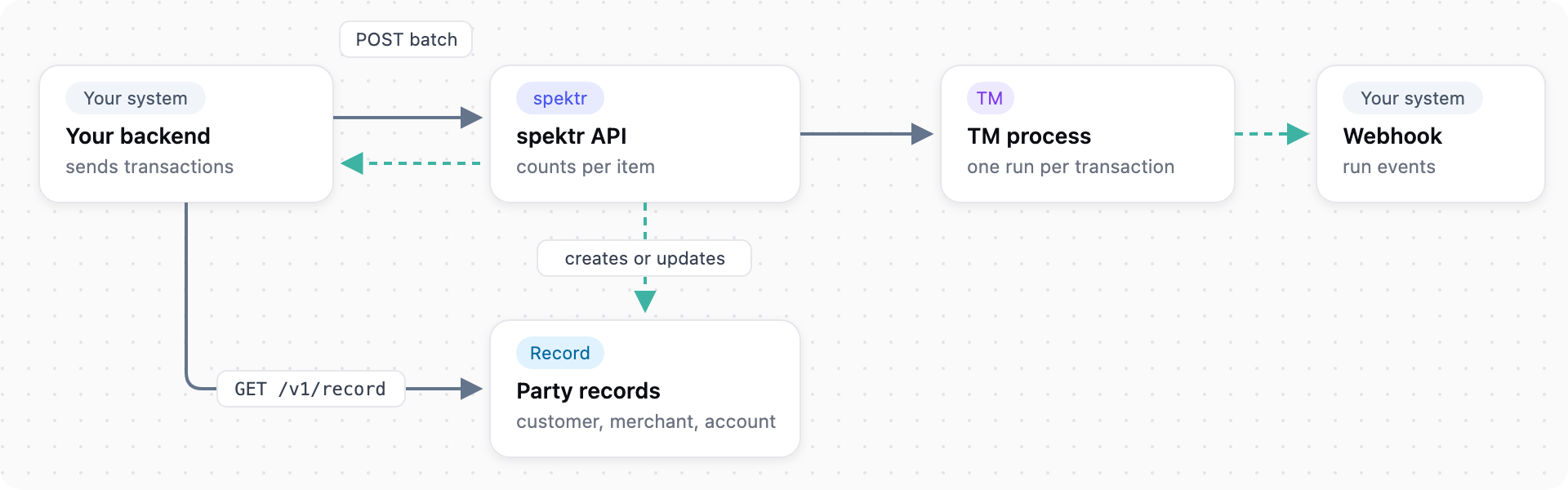
Send a batch, get run events, read the party record.
Batch and periodic runs send process_run_start and process_run_end, periodic runs add alert_escalated and alert_resolved, and real-time runs return the result in the response. Events arrive in batches and may repeat, so deduplicate on each event id. Delivery rules are described in Webhooks.
Reference: process_run_end, fetch a record
5. Build rules and go live
Dashboard
Build aggregations, then rules, in the dashboard. Backtest them over stored transactions until each rule fires where intended. Then go live with the process type you chose in step 3.
Reference: alert definitions, testing a process
Test it
Sandbox is for UAT and Test is for development. Both use cloned configuration and lower rate limits. Cloning Live copies processes, fields and dataset schemas, never records or transactions. See Environments.
Send batches to sandbox-ingest.spektr.com. For real-time testing, ask spektr for the current host. Ingest a transaction with a new customer and merchant, then confirm one record per bound dataset and both account legs in the account dataset. You can't force an outcome, so validate rules with the backtest.
Go-live checklist
- Transaction monitoring is enabled and the definition is registered with each link bound to the right dataset.
- Existing records use the identifiers your transactions send.
- Every transaction carries
type, a stabletransaction_idandtransactionDatein epoch ms, and retries re-send the sametransaction_id. - Types, link keys and unknown values follow the rules in step 2.
- Your batch client reads
failedanderrorson every call. - Each rule fires where intended in a backtest.
- Live keys and a Live webhook endpoint are configured separately from Sandbox.
Next steps
- Get results into your systems. Every event and its payload is in the webhook events reference.
- Verify webhooks. See Webhook HMAC signature verification.
- Full API. Every call above is in the API reference.
Behaviour described here reflects the platform on 2 October 2026.
Updated about 15 hours ago